08.04.2013 09:58
python webbrowser module
This is a web only version of the mac open or linux xdg-open commands:
import webbrowser
webbrowser.open('http://docs.python.org/2/library/webbrowser.html')
I heard about webbrowser via
Sorting with Pythonista, which also introduced me to the iOS Pythonista app for the ipad/iphone.
07.31.2013 19:08
python and numpy with slices
I never really got python slices before now.
I read http://docs.python.org/2/library/functions.html#slice and http://docs.python.org/2/library/itertools.html#itertools.islice. These 3 examples all make a hole
in a np.zeros((10,10)) grid:
grid = np.zeros((10,10))
grid[slice(2,5), slice(3,7)] = 1

# is equivalent to:

grid = np.zeros((10,10))
for y in range(3,7):
    grid[slice(2, 5), y] = 1

# and also:

grid = np.zeros((10,10))
for x in xrange(2,5):
    for y in xrange(3,7):
        grid[x][y] = 1
07.30.2013 18:46
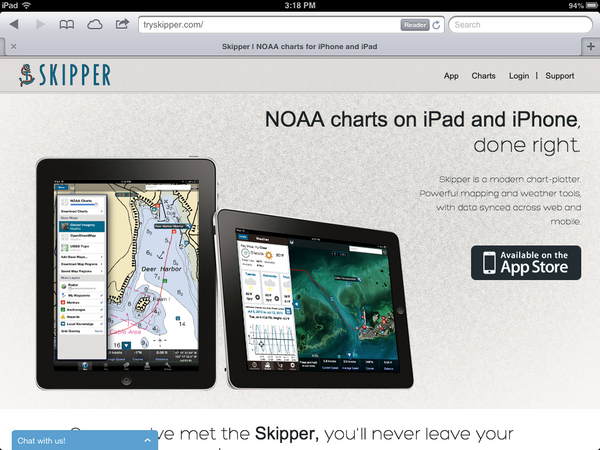
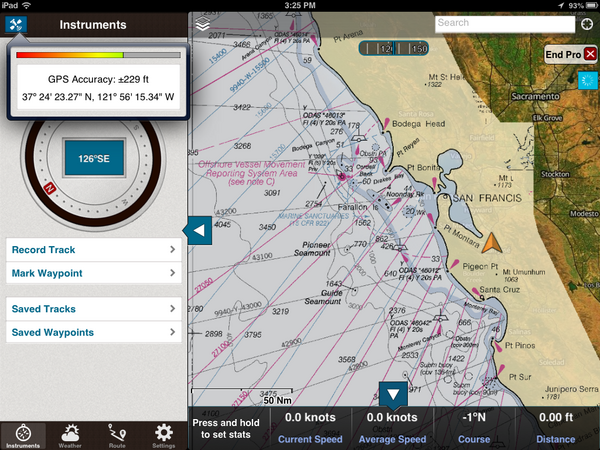
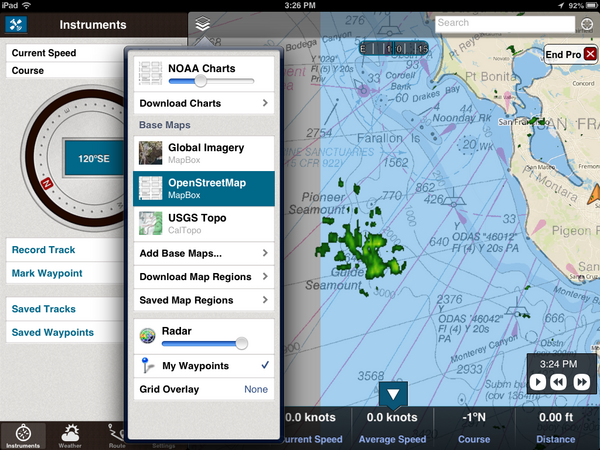
TrailBehind's Skipper
An interesting new entry into the iPad charting world: http://www.tryskipper.com/. NOAA Charts, Weather Radar, the ability to try out the for pay app from the free with no hassle.
07.25.2013 00:31
GMT5 will use CMake
Oh hell. I don't like cmake. Autoconf is hard, but cmake and scons
just make me want to walk away. And this after we got mb-system to
build with autoconf. GMT 5 switches from autoconf to cmake:
Transition from GNU Autotools to CMake
Transition from GNU Autotools to CMake
| GNU autotools | CMake |
| ./configure | cmake <source-dir> |
| make distclean | rm <build-dir> |
| rm config.cache | rm CMakeCache.txt |
| –prefix | CMAKE_INSTALL_PREFIX |
| –enable-netcdf | NETCDF_ROOT |
| –enable-gdal | GDAL_ROOT |
| –enable-pcre | PCRE_ROOT |
| –enable-matlab | MATLAB_ROOT |
| –enable-debug | CMAKE_BUILD_TYPE |
| –enable-triangle | LICENSE_RESTRICTED |
| –enable-US | UNITS |
| –enable-flock | FLOCK |
| CFLAGS | CMAKE_C_FLAGS |
| guru/gmtguru.macros | cmake/ConfigUser.cmake |
07.23.2013 10:14
The dangers of automation
United Airlines on over-reliance on automation. I had discussions
with a NOAA captain a few years ago. The captain said that he often
gives his bridge crew a twist on many of the transits into or out of
harbors. For example, he would hide the radar from the bridge crew.
He can keep an eye on things and take over should something come up.
The idea is to make sure the crew is effective no matter what and not
dependent on any one technology to safely navigate. Or navigate only
with paper charts. And so forth.
An old video, but still very interesting. "Task saturating the crew" and using an autopilot to try to avoid a mid-air collision.
And this would be an under-reliance on technology... it's not the smartest thing ever to put yourself in the path of a feeding animal. Did these people have permit for this? Seems like even if they did, this is far beyond stupid.
An old video, but still very interesting. "Task saturating the crew" and using an autopilot to try to avoid a mid-air collision.
And this would be an under-reliance on technology... it's not the smartest thing ever to put yourself in the path of a feeding animal. Did these people have permit for this? Seems like even if they did, this is far beyond stupid.
07.21.2013 15:47
Big Data discussion at Ocean Exploration 2020
I recorded the panel session for the question on big data and cloud computing. I was sitting in the back and the audio is not very good. To help with that, I transcribed the video. This text is available as CC in in the video. It should be pretty close to what Dawn Wright [ESRI] and Jenifer Austin Foulkes [Google] were saying. I've added some links and the video is at the end of this post.
MARCIA: [missed the first part of the question]
grabbing video data, photographic information, high bandwidth data. What are your thoughts as representatives of organizations that are familiar with handling large amounts of data as to what are the prospects for rapid QA/QC and effective effective technologies for serving up that data to the public and in particular when we think of like HD (high definition) data that scientists are going to demand for doing research, how one can actually deliver that data to those who might need it in it's full quality?
[Jenifer passes the question to Dawn to go first]
DAWN: Fantastic question Marcia. And I think in terms of dealing with all of these, I mentioned among the 4 V's, was "variety." We had not really had a discussion yet about video data as a part of that V, and that's going to be very critical.
[The 4 V's: Volume, Variety, Velocity, Veracity]
MARCIA: So that's a 5th V?
DAWN: No. That's actually within the V of variety. In terms of, we have photographs, videos, text files, points, lines and polygons and observations, visualizations, scientific models. But within all that variety, we have not spoken that much about videos. And Christian Germain's [possibly the right person] comments to that extent were very pertinent to this, because with these long archives of these videos that we want to not only preserve, but also make available quickly, that's again where partnerships are very important. Because, with our academic and government agencies there has been a lot of work and a lot of funding to creating these archives, maintaining them, but sometimes the next step is not always easily attainable, particularly if your funding runs out And so for instance with Kate's situation with Neptune Canada, where there's been a data management system put in place, and your looking to do the next step, this is where I think the public-private partnership can really play a role. Because if your are able to work with companies who are actually looking at some of these problems in terms research. So I'd like to just step to the side a little bit to talk about how important this is when we think about research versus exploration. We've talked about "Is exploration part of research?" Is there a continuum of these two. Are they broad end points? Or are you really a scientist? I think in terms of ocean exploration. The ocean exploration challenges are actually the research questions, the research problems of information technology or data science. So, we want those kinds of challenges. So, being able to archive, QA/QC, and quickly disseminate video and other kinds of observations is something that is DELICIOUS to Google, to ESRI, to our partners. So, Marinexplore is a new startup company in Silicon Valley, that is building a marine platform. They are even building a marine operating system. And they are working now on specific machine learning techniques to automatically go through and QA/QC satellite observations and I think that could be applied to video. So I think it is just a matter of getting in. There was a discussion of a national "huddle." We could have a data or technology huddle and talk about some of these challenges in smaller groups and come up with very useful partner ships to solve these problems.
MARCIA: Okay. Great. Jen?
JENIFER: Yeah, I think that all sounds wonderful. You know I would say that towards your question, Google has some tools that can help dealing with large data. And those that I'm familiar with YouTube for video and so there's several groups like NOAA [NOAA Ship Okeanos Explorer - Best VIDEOS Of 2012-2010] and Schmidt Ocean Institute who are using YouTube Live, you know, to record and share video from their expeditions
MARCIA: Is it full HD TV?
JENIFER: It has full HD TV. Yeah. So I think that's a great tool for video. With regard to analysis, I'm not sure. I'm sure if it can do automated feature extraction. That would be something to look into. And Chris might have mentioned that. so I think the other thing would be Kurt has done a lot of work using our cloud hosting infrastructure to upload large amount of data. Specifically, looking at the space-based AIS ship tracking data [SpaceQuest] and then using Compute Engine to do really fast query analysis. I think that is a tool. He's been working on a bit of a how-to, how you can do it as well, to come out in the future. You can see his talk from Google I/O. [Google I/O 2013 - All the Ships in the World: Visualizing Data with Google Cloud and Maps] Kurt Schwehr, formerly from UNH, in the back there. He'd be happy to talk to anyone about his explorations using our Cloud Store for handling big data. And there is another tools, Google Maps Engine, which has been used for geospatial data and Earth Engine is a project where they look at cloud hosting large amounts of imagery data. So they put all the Landsat imagery in the cloud to allow scientists to do really fast change analysis for forest fires now and forest coverage changes. And that's been really powerful. Analysis that before took months, they do in like a day or a really short period of time. So I think that whole power of being able to, you know, do queries across lots and lots and lots of machines is a future tool that can be really really powerful. And I'm happy to be a part of the story.
DAWN: I think what Jenifer is referring to in terms of the cloud. You know, the cloud is another one of these terms that may be a mystery term. And I tend to think of a, literally, an atmospheric cloud in my head. But, we are talking about really a paradigm shift in computing and data distribution and there is some bit of trepidation about it But I think it is something that is really becoming more secure, more powerful, and easier to use. In the information technology world, we are all going that way. And so the cloud infrastructure is somthing that is going to be very powerful and something that ocean exploration really needs to embrace to a certain extent or to at least investigate. Be willing to have an open mind to investigate it. This is also It's going to be much more efficient, much faster. To the point that I made earlier about not just moving our datasets back and forth, but actually moving analysis, the analyses that Jenifer and I have been talking about, moving that to the data once and then you have your outputs from that can go out much more quickly including to the general public and to school kids on their tablets
MARCIA: So, let's suppose we're at a point [video cut off]
Since Dawn mentioned security, you can check out: Google-CommonSecurity-WhitePaper-v1.4.pdf: Google’s Approach to IT Security A Google White Paper [2012]. Google has ISO 27001 certification. Michael Manoocheri: Google I/O 2011: Compliance and Security in the Cloud [YouTube video]
07.20.2013 12:10
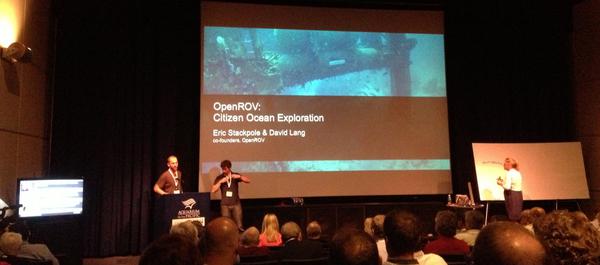
OceanExploration 2020 meeting at the Aquarium of the Pacific
Lots of discussion of where we want to go in the future (next 7 years)
at the Ocean
Exploration 2020 meeting at the Aquarium of the Pacific.
You can join in for a lot of this via web streaming.
This morning, we've heard from people like Marcia McNutt and Kathy Sullivan
From yesterday:
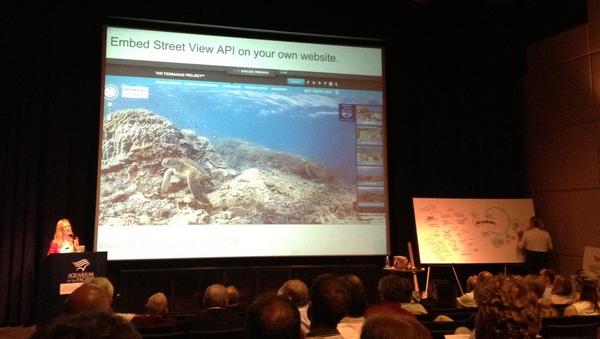
From today:
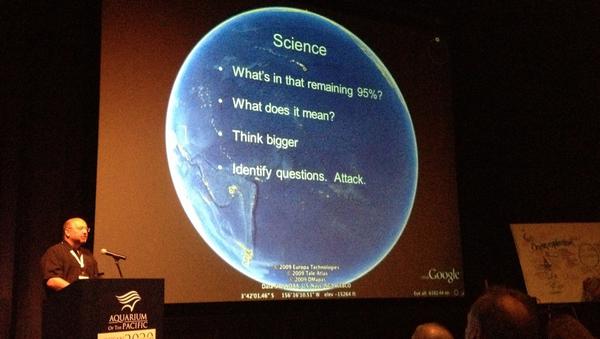
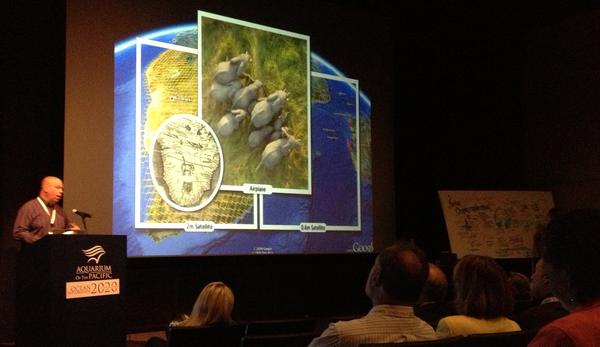
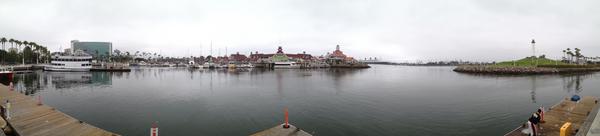
Walter Monk recommended that conference include a dedication to ADM James D. Watkins who passed away a year ago. The oceans community owes ADM Watkins quite a bit.
Dave Caress and I have been working a bunch on the autoconf setup for mb-system while at the conference. I'm looking at parts of the mapserver configure.in setup when figuring out how mb-system will make sure that it can link against libraries like gdal.
#oe2020
This morning, we've heard from people like Marcia McNutt and Kathy Sullivan
From yesterday:
From today:
Walter Monk recommended that conference include a dedication to ADM James D. Watkins who passed away a year ago. The oceans community owes ADM Watkins quite a bit.
Dave Caress and I have been working a bunch on the autoconf setup for mb-system while at the conference. I'm looking at parts of the mapserver configure.in setup when figuring out how mb-system will make sure that it can link against libraries like gdal.
#oe2020
07.14.2013 23:19
Python logging module
I made big use of the python logging module in my Google I/O talk 2
months ago, but you'd never know it from the talk. I created a python
logging module around the boto library that periodically writes to
cloud store. And you can also register a logger to log locally with
log rotation, etc.
https://github.com/gmr/pycon2013-logging
https://github.com/gmr/pycon2013-logging
07.10.2013 11:48
First contribution to gdal
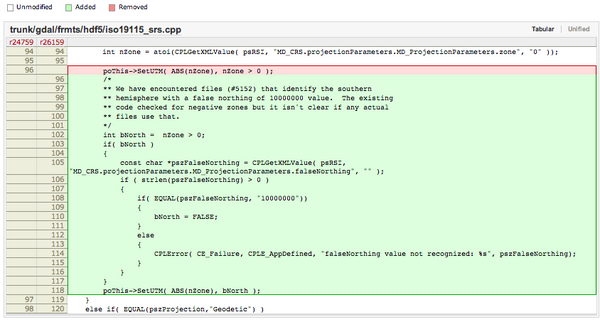
Yesterday, I made my first contribution to gdal. Frank pinged me with
bug 5152 - False
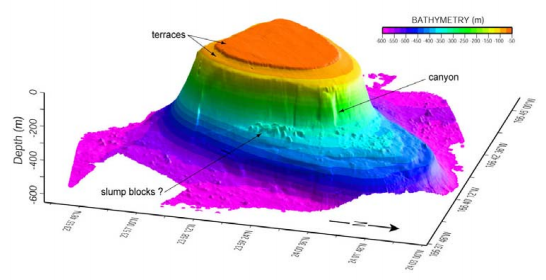
northing in BAG georeferencing is ignored. I took a quick walk
through W00158
(NOAA Hydrographic survey from the R/V AHI in American Samoa). gdal was
placing the survey way up in the artic.
I got the extra bonus of being able to have Frank look over my shoulder at each step and I had a working solution in short order. Frank was then kind enough to put in my patch and add an explanation comment: r26159
I got the extra bonus of being able to have Frank look over my shoulder at each step and I had a working solution in short order. Frank was then kind enough to put in my patch and add an explanation comment: r26159
07.07.2013 23:31
Illegal, Unreported and Unregulated (IUU) Fishing
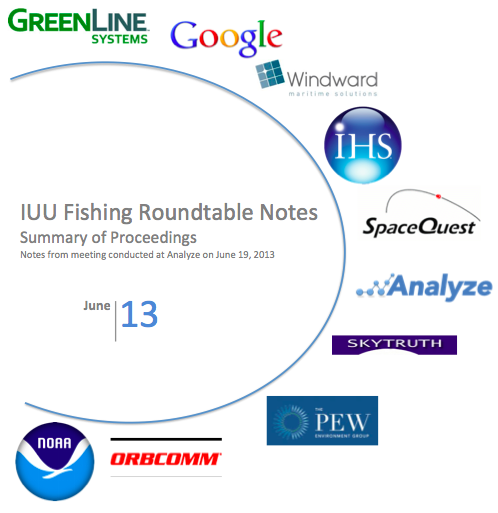
Analyze recently hosted a meeting on IUU fishing. I did not attend, but
Analyze has released notes from the meeting.
Analyze Hosts First IUU Fishing Roundtable: word doc [Analyze] and pdf
Analyze Hosts First IUU Fishing Roundtable: word doc [Analyze] and pdf
07.06.2013 09:52
ipython notebook for coastal ocean models
Scipy 2013 videos
Slides and code from the talks
I love this:
Emacs + org-mode + python in reproducible research; SciPy 2013 Presentation by John Kitchin at CMU. View the org file as rendered by github - pdf
Slides and code from the talks
I love this:
Emacs + org-mode + python in reproducible research; SciPy 2013 Presentation by John Kitchin at CMU. View the org file as rendered by github - pdf
07.01.2013 20:00
NSA special series
There are a lot of fun documents available from the NSA. e.g. UNITED
STATES CRYPTOLOGIC HISTORY Special Series Crisis Collection Volume 1
Attack on a Sigint Collector, the U.S.S. Liberty, 1981
I'm now reading "It Wasn't All Magic: The Early Struggle to Automate Cryptaalysis, 1930's - 1960's." by Colin Burke, 2002.TOP
SECRET//COMINT//REL TO USA, AUS, GAN, GBR and NZL/X1
Cryptologic Histories
To make sure I get proper NSA notice, M-x spook:
HAMASMOIS government SWAT anthrax ammunition quarter S Key SAPO gamma TELINT FTS2000 MILSATCOM PET Peking UNSCOM
Notes from reading (all wikipedia):
I'm now reading "It Wasn't All Magic: The Early Struggle to Automate Cryptaalysis, 1930's - 1960's." by Colin Burke, 2002.
Cryptologic Histories
To make sure I get proper NSA notice, M-x spook:
HAMASMOIS government SWAT anthrax ammunition quarter S Key SAPO gamma TELINT FTS2000 MILSATCOM PET Peking UNSCOM
Notes from reading (all wikipedia):
06.30.2013 21:51
A simple library autoconf example
I know there are a lot of other autoconf examples out there, but these
are mine. The process of creating the examples is me learning about
autoconf. I'm a long way from my first attempt at writing autoconf
for netcat in 1999 before netcat was rewritten.
I have started pushing my examples to github. I would like it if the code in my examples could be used in any project without attribution. I just don't want the collection as a whole to get taken without attribution.
https://github.com/schwehr/autoconf_samples
This example is a stripped down C++ library with a single function and builds a binary that uses that library. I'm a little surprised that it does a static link by default. I'm trying to increment simple_lib just a little beyond the endian example.
The Makefile.am gets much more complicated. I'm not 100% sure that I have this right. If anyone has a better way to specify and track the library version info, please let me know. I do know that you are supposed to refer to the locally built libraries with libFOO.la (not -lFOO) and let autoconf/automake do the right thing.
I have two helper scripts. First is and extention of the autogen.sh script. It makes sure there is an m4 directory and tells autoreconf to put what it can in that directory.
I have started pushing my examples to github. I would like it if the code in my examples could be used in any project without attribution. I just don't want the collection as a whole to get taken without attribution.
https://github.com/schwehr/autoconf_samples
This example is a stripped down C++ library with a single function and builds a binary that uses that library. I'm a little surprised that it does a static link by default. I'm trying to increment simple_lib just a little beyond the endian example.
ls -l
total 56
-rw-r--r--  1 schwehr  5000    0 Jun 30 15:42 AUTHORS
-rw-r--r--  1 schwehr  5000    0 Jun 30 15:42 ChangeLog
-rw-r--r--  1 schwehr  5000  271 Jun 30 15:54 Makefile.am
-rw-r--r--  1 schwehr  5000    0 Jun 30 15:42 NEWS
-rw-r--r--  1 schwehr  5000    0 Jun 30 15:42 README
-rwxr-xr-x  1 schwehr  5000   99 Jun 30 15:41 autogen.sh
-rwxr-xr-x  1 schwehr  5000  140 Jun 30 16:04 clean.sh
-rw-r--r--  1 schwehr  5000  401 Jun 30 18:35 configure.ac
-rw-r--r--  1 schwehr  5000  102 Jun 30 16:08 simple.cc
-rw-r--r--  1 schwehr  5000   14 Jun 30 15:46 simple.h
-rw-r--r--  1 schwehr  5000   60 Jun 30 15:52 simple_prog.cc
First, the configure:
AC_PREREQ([2.65])
LT_PREREQ([2.4.2])

AC_CONFIG_MACRO_DIR(m4)

AC_INIT([simple],[1.0])
LT_INIT

AM_INIT_AUTOMAKE
AM_MAINTAINER_MODE
AC_PROG_CXX

AC_CONFIG_FILES([Makefile])
AC_CONFIG_HEADERS([config.h])

AC_OUTPUT

AS_ECHO
AS_ECHO([Results])
AS_ECHO
AS_ECHO(["$PACKAGE_STRING will be installed in: ${prefix}"])
AS_ECHO(["Use shared libs: $enable_shared"])
AS_ECHO(["Use static libs: $enable_static"])
A quick tour of the changes... First, I added libtool macros. The
LT_INIT sets up everything needed to build static and shared
libraries. I added AC_CONFIG_MACRO_DIR to try to hide more of the
autoconf/libtools stuff under a m4 directory. Then I added
AM_MAINTAINER_MODE, but that doesn't actually seem to add much. Then
I switch the AM C compiler macro with AC_PROG_CXX. Finally, I wanted
to demonstrate having a results summary section. The autoconf manuals
say that we should not use the shell echo command directly, so I used
AS_ECHO to print out the key results of the configure stage.
The Makefile.am gets much more complicated. I'm not 100% sure that I have this right. If anyone has a better way to specify and track the library version info, please let me know. I do know that you are supposed to refer to the locally built libraries with libFOO.la (not -lFOO) and let autoconf/automake do the right thing.
ACLOCAL_AMFLAGS = -I m4

include_HEADERS = simple.h

lib_LTLIBRARIES = libsimple.la

libsimple_la_LDFLAGS = -no-undefined -version-info 0:0:0
libsimple_la_SOURCES = simple.cc

bin_PROGRAMS = simple_prog
simple_prog_SOURCES = simple_prog.cc
simple_prog_LDADD = simple.lo
I'm using a fully automatic config.h (I have no config.h.in), so I need to include the config.h in simple.cc:
#include "config.h"

#include <iostream>

void hello() {
  std::cout << "Hello world from a lib\n";
}
Pretty boring library, but it does demonstrate the library.
I have two helper scripts. First is and extention of the autogen.sh script. It makes sure there is an m4 directory and tells autoreconf to put what it can in that directory.
#!/bin/bash

if [ ! -d m4 ]; then
  echo mkdir
  mkdir m4
fi

autoreconf --force --install -I m4
The 2nd script is clean. It uses the maintainer-clean in the Makefile, but there is still a lot of autogenerated stuff, so I also rm the left overs.
#!/bin/bash

make maintainer-clean
rm -rf INSTALL Makefile.in aclocal.m4 compile config.*
rm -rf configure depcomp install-sh ltmain.sh m4 missing
To build everything, here is what I do:
./autogen.sh
mkdir
libtoolize: putting auxiliary files in `.'.
libtoolize: copying file `./ltmain.sh'
libtoolize: putting macros in AC_CONFIG_MACRO_DIR, `m4'.
libtoolize: copying file `m4/libtool.m4'
libtoolize: copying file `m4/ltoptions.m4'
libtoolize: copying file `m4/ltsugar.m4'
libtoolize: copying file `m4/ltversion.m4'
libtoolize: copying file `m4/lt~obsolete.m4'
configure.ac:7: installing './config.guess'
configure.ac:7: installing './config.sub'
configure.ac:9: installing './install-sh'
configure.ac:9: installing './missing'
Makefile.am: installing './INSTALL'
Makefile.am: installing './COPYING' using GNU General Public License v3 file
Makefile.am:     Consider adding the COPYING file to the version control system
Makefile.am:     for your code, to avoid questions about which license your project uses
Makefile.am: installing './depcomp'
./configure --enable-maintainer-mode --enable-dependency-tracking
checking build system type... x86_64-apple-darwin12.4.0
checking host system type... x86_64-apple-darwin12.4.0
checking how to print strings... printf
checking for gcc... gcc
checking whether the C compiler works... yes
checking for C compiler default output file name... a.out
checking for suffix of executables...
checking whether we are cross compiling... no
checking for suffix of object files... o
checking whether we are using the GNU C compiler... yes
checking whether gcc accepts -g... yes
checking for gcc option to accept ISO C89... none needed
checking for a sed that does not truncate output... /sw/bin/sed
checking for grep that handles long lines and -e... /usr/bin/grep
checking for egrep... /usr/bin/grep -E
checking for fgrep... /usr/bin/grep -F
checking for ld used by gcc... /usr/llvm-gcc-4.2/libexec/gcc/i686-apple-darwin11/4.2.1/ld
checking if the linker (/usr/llvm-gcc-4.2/libexec/gcc/i686-apple-darwin11/4.2.1/ld) is GNU ld... no
checking for BSD- or MS-compatible name lister (nm)... /usr/bin/nm
checking the name lister (/usr/bin/nm) interface... BSD nm
checking whether ln -s works... yes
checking the maximum length of command line arguments... 196608
checking whether the shell understands some XSI constructs... yes
checking whether the shell understands "+="... yes
checking how to convert x86_64-apple-darwin12.4.0 file names to x86_64-apple-darwin12.4.0 format... func_convert_file_noop
checking how to convert x86_64-apple-darwin12.4.0 file names to toolchain format... func_convert_file_noop
checking for /usr/llvm-gcc-4.2/libexec/gcc/i686-apple-darwin11/4.2.1/ld option to reload object files... -r
checking for objdump... no
checking how to recognize dependent libraries... pass_all
checking for dlltool... no
checking how to associate runtime and link libraries... printf %s\n
checking for ar... ar
checking for archiver @FILE support... no
checking for strip... strip
checking for ranlib... ranlib
checking for gawk... gawk
checking command to parse /usr/bin/nm output from gcc object... ok
checking for sysroot... no
checking for mt... no

[snip]

checking how to run the C++ preprocessor... g++ -E
checking for ld used by g++... /usr/llvm-gcc-4.2/libexec/gcc/i686-apple-darwin11/4.2.1/ld
checking if the linker (/usr/llvm-gcc-4.2/libexec/gcc/i686-apple-darwin11/4.2.1/ld) is GNU ld... no
checking whether the g++ linker (/usr/llvm-gcc-4.2/libexec/gcc/i686-apple-darwin11/4.2.1/ld) supports shared libraries... yes
checking for g++ option to produce PIC... -fno-common -DPIC
checking if g++ PIC flag -fno-common -DPIC works... yes
checking if g++ static flag -static works... no
checking if g++ supports -c -o file.o... yes
checking if g++ supports -c -o file.o... (cached) yes
checking whether the g++ linker (/usr/llvm-gcc-4.2/libexec/gcc/i686-apple-darwin11/4.2.1/ld) supports shared libraries... yes
checking dynamic linker characteristics... darwin12.4.0 dyld
checking how to hardcode library paths into programs... immediate
checking dependency style of g++... gcc3
checking that generated files are newer than configure... done
configure: creating ./config.status
config.status: creating Makefile
config.status: creating config.h
config.status: executing libtool commands
config.status: executing depfiles commands

Results

simple 1.0 will be installed in: /usr/local
Use shared libs: yes

make
make  all-am
/bin/sh ./libtool --tag=CXX   --mode=compile g++ -DHAVE_CONFIG_H -I.     -g -O2 -MT simple.lo -MD -MP -MF .deps/simple.Tpo -c -o simple.lo simple.cc
libtool: compile:  g++ -DHAVE_CONFIG_H -I. -g -O2 -MT simple.lo -MD -MP -MF .deps/simple.Tpo -c simple.cc  -fno-common -DPIC -o .libs/simple.o
libtool: compile:  g++ -DHAVE_CONFIG_H -I. -g -O2 -MT simple.lo -MD -MP -MF .deps/simple.Tpo -c simple.cc -o simple.o >/dev/null 2>&1
mv -f .deps/simple.Tpo .deps/simple.Plo
/bin/sh ./libtool --tag=CXX   --mode=link g++  -g -O2 -no-undefined -version-info 0:0:0  -o libsimple.la -rpath /usr/local/lib simple.lo
libtool: link: g++ -dynamiclib  -o .libs/libsimple.0.dylib  .libs/simple.o    -O2   -install_name  /usr/local/lib/libsimple.0.dylib -compatibility_version 1 -current_version 1.0 -Wl,-single_module
libtool: link: (cd ".libs" && rm -f "libsimple.dylib" && ln -s "libsimple.0.dylib" "libsimple.dylib")
libtool: link: ar cru .libs/libsimple.a  simple.o
libtool: link: ranlib .libs/libsimple.a
libtool: link: ( cd ".libs" && rm -f "libsimple.la" && ln -s "../libsimple.la" "libsimple.la" )
g++ -DHAVE_CONFIG_H -I.     -g -O2 -MT simple_prog.o -MD -MP -MF .deps/simple_prog.Tpo -c -o simple_prog.o simple_prog.cc
mv -f .deps/simple_prog.Tpo .deps/simple_prog.Po
/bin/sh ./libtool --tag=CXX   --mode=link g++  -g -O2   -o simple_prog simple_prog.o simple.lo
libtool: link: g++ -g -O2 -o simple_prog simple_prog.o .libs/simple.o -Wl,-bind_at_load
Now the results:
otool -L simple_prog
simple_prog:
	/usr/lib/libstdc++.6.dylib (compatibility version 7.0.0, current version 56.0.0)
	/usr/lib/libSystem.B.dylib (compatibility version 1.0.0, current version 169.3.0)
./simple_prog
Hello world from a lib
ls -l .libs/
total 144
-rwxr-xr-x  1 schwehr  5000   9508 Jun 30 19:20 libsimple.0.dylib
-rw-r--r--  1 schwehr  5000  23376 Jun 30 19:20 libsimple.a
lrwxr-xr-x  1 schwehr  5000     17 Jun 30 19:20 libsimple.dylib -> libsimple.0.dylib
lrwxr-xr-x  1 schwehr  5000     15 Jun 30 19:20 libsimple.la -> ../libsimple.la
-rw-r--r--  1 schwehr  5000    922 Jun 30 19:20 libsimple.lai
-rw-r--r--  1 schwehr  5000  23184 Jun 30 19:20 simple.o
06.30.2013 10:36
A simple autoconf example
In going through autoconf setup for mb-system, I have started feeling
much better about autoconf. I think that one of the main things
missing are a nice collection of simple examples. I wanted to see
what it looked like to setup an example of the bare minimum to test
byte order. Here is what I did.
First, create a file called configure.ac (formerly known as configure.in):
This basically says that we have an autoconf 2.65 based configuration for a project called "endian". We want to use automake to build C programs and that we need to know the endian-ness of the machine.
Next, I need an automake input file, Makefile.am, that says how to build our endian.c code.
First, add this line to the configure.ac right after AC_CONFIG_FILES:
First, create a file called configure.ac (formerly known as configure.in):
AC_PREREQ([2.65])

AC_INIT([endian],[1.0])

AM_INIT_AUTOMAKE
dnl AM_MAINTAINER_MODE
AM_PROG_CC_C_O

AC_C_BIGENDIAN

dnl AC_CONFIG_HEADERS([config.h])
AC_CONFIG_FILES([Makefile])

AC_OUTPUT
Note that "dnl" is the start of comment designation (aka Do Not Load).
This basically says that we have an autoconf 2.65 based configuration for a project called "endian". We want to use automake to build C programs and that we need to know the endian-ness of the machine.
Next, I need an automake input file, Makefile.am, that says how to build our endian.c code.
bin_PROGRAMS = endian
endian_SOURCES = endian.c
And now for the source code:
#include <stdio.h>

int main(void) {
#ifdef WORDS_BIGENDIAN
  printf("big\n");
  return 1;
#else
  printf("little\n");
  return 0;
#endif
}
To set this up, create an autogen.sh script:
#!/bin/bash

autoreconf --force --install
We are now ready to try building our project.
chmod +x autogen.sh
ls -l
total 32
-rw-r--r--  1 schwehr  5000   48 Jun 29 23:04 Makefile.am
-rwxr-xr-x  1 schwehr  5000  102 Jun 30 07:50 autogen.sh
-rw-r--r--  1 schwehr  5000  226 Jun 30 07:51 configure.ac
-rw-r--r--  1 schwehr  5000  140 Jun 29 23:23 endian.c
./autogen.sh
configure.ac:8: installing './compile'
configure.ac:6: installing './install-sh'
configure.ac:6: installing './missing'
Makefile.am: installing './INSTALL'
Makefile.am: error: required file './NEWS' not found
Makefile.am: error: required file './README' not found
Makefile.am: error: required file './AUTHORS' not found
Makefile.am: error: required file './ChangeLog' not found
Makefile.am: installing './COPYING' using GNU General Public License v3 file
Makefile.am:     Consider adding the COPYING file to the version control system
Makefile.am:     for your code, to avoid questions about which license your project uses
Makefile.am: installing './depcomp'
autoreconf: automake failed with exit status: 1
touch AUTHORS ChangeLog NEWS README
./autogen.sh
# No output
ls -l
total 696
-rw-r--r--  1 schwehr  5000       0 Jun 30 07:54 AUTHORS
-rw-r--r--  1 schwehr  5000   35147 Jun 30 07:53 COPYING
-rw-r--r--  1 schwehr  5000       0 Jun 30 07:54 ChangeLog
-rw-r--r--  1 schwehr  5000   15749 Jun 30 07:55 INSTALL
-rw-r--r--  1 schwehr  5000      48 Jun 29 23:04 Makefile.am
-rw-r--r--  1 schwehr  5000   20989 Jun 30 07:55 Makefile.in
-rw-r--r--  1 schwehr  5000       0 Jun 30 07:54 NEWS
-rw-r--r--  1 schwehr  5000       0 Jun 30 07:54 README
-rw-r--r--  1 schwehr  5000   36026 Jun 30 07:55 aclocal.m4
-rwxr-xr-x  1 schwehr  5000     106 Jun 30 07:55 autogen.sh
drwxr-xr-x  7 schwehr  5000     238 Jun 30 07:55 autom4te.cache
-rwxr-xr-x  1 schwehr  5000    7333 Jun 30 07:55 compile
-rwxr-xr-x  1 schwehr  5000  160168 Jun 30 07:55 configure
-rw-r--r--  1 schwehr  5000     226 Jun 30 07:51 configure.ac
-rwxr-xr-x  1 schwehr  5000   23910 Jun 30 07:55 depcomp
-rw-r--r--  1 schwehr  5000     140 Jun 29 23:23 endian.c
-rwxr-xr-x  1 schwehr  5000   13997 Jun 30 07:55 install-sh
-rwxr-xr-x  1 schwehr  5000   10179 Jun 30 07:55 missing
Now we have a world that will hopefully work. We need to try it out.
./configure --help
`configure' configures endian 1.0 to adapt to many kinds of systems.

Usage: ./configure [OPTION]... [VAR=VALUE]...

To assign environment variables (e.g., CC, CFLAGS...), specify them as
VAR=VALUE.  See below for descriptions of some of the useful variables.

Defaults for the options are specified in brackets.

Configuration:
  -h, --help              display this help and exit
      --help=short        display options specific to this package
      --help=recursive    display the short help of all the included packages
  -V, --version           display version information and exit
...
  CPP         C preprocessor

Use these variables to override the choices made by `configure' or to help
it to find libraries and programs with nonstandard names/locations.

Report bugs to the package provider.

./configure --prefix=/tmp/endian
checking for a BSD-compatible install... /sw/bin/ginstall -c
checking whether build environment is sane... yes
checking for a thread-safe mkdir -p... /sw/bin/gmkdir -p
checking for gawk... gawk
checking whether make sets $(MAKE)... yes
checking for style of include used by make... GNU
checking for gcc... gcc
checking whether the C compiler works... yes
checking for C compiler default output file name... a.out
checking for suffix of executables...
checking whether we are cross compiling... no
checking for suffix of object files... o
checking whether we are using the GNU C compiler... yes
checking whether gcc accepts -g... yes
checking for gcc option to accept ISO C89... none needed
checking dependency style of gcc... gcc3
checking whether gcc and cc understand -c and -o together... yes
checking how to run the C preprocessor... gcc -E
checking for grep that handles long lines and -e... /usr/bin/grep
checking for egrep... /usr/bin/grep -E
checking for ANSI C header files... yes
checking for sys/types.h... yes
checking for sys/stat.h... yes
checking for stdlib.h... yes
checking for string.h... yes
checking for memory.h... yes
checking for strings.h... yes
checking for inttypes.h... yes
checking for stdint.h... yes
checking for unistd.h... yes
checking whether byte ordering is bigendian... no
checking that generated files are newer than configure... done
configure: creating ./config.status
config.status: creating Makefile
config.status: executing depfiles commands

ls -l config.{status,log} Makefile
-rw-r--r--  1 schwehr  5000  21248 Jun 30 07:59 Makefile
-rw-r--r--  1 schwehr  5000  14512 Jun 30 07:59 config.log
-rwxr-xr-x  1 schwehr  5000  29185 Jun 30 07:59 config.status

make
gcc -DPACKAGE_NAME=\"endian\" -DPACKAGE_TARNAME=\"endian\" \
-DPACKAGE_VERSION=\"1.0\" -DPACKAGE_STRING=\"endian\ 1.0\" \
-DPACKAGE_BUGREPORT=\"\" -DPACKAGE_URL=\"\" -DPACKAGE=\"endian\" \
-DVERSION=\"1.0\" -DSTDC_HEADERS=1 -DHAVE_SYS_TYPES_H=1 \
-DHAVE_SYS_STAT_H=1 -DHAVE_STDLIB_H=1 -DHAVE_STRING_H=1 \
-DHAVE_MEMORY_H=1 -DHAVE_STRINGS_H=1 -DHAVE_INTTYPES_H=1 \
-DHAVE_STDINT_H=1 -DHAVE_UNISTD_H=1 -I.     \
-g -O2 -MT endian.o -MD -MP -MF .deps/endian.Tpo -c -o endian.o endian.c
mv -f .deps/endian.Tpo .deps/endian.Po
gcc  -g -O2   -o endian endian.o

ls -l endian.o endian
-rwxr-xr-x  1 schwehr  5000  9048 Jun 30 08:00 endian
-rw-r--r--  1 schwehr  5000  2328 Jun 30 08:00 endian.o

make install
 /sw/bin/gmkdir -p '/tmp/endian/bin'
  /sw/bin/ginstall -c endian '/tmp/endian/bin'
make[1]: Nothing to be done for `install-data-am'.

ls -la /tmp/endian/bin/
total 24
drwxr-xr-x  3 schwehr  wheel   102 Jun 30 08:01 .
drwxr-xr-x  3 schwehr  wheel   102 Jun 30 08:01 ..
-rwxr-xr-x  1 schwehr  wheel  9048 Jun 30 08:01 endian

/tmp/endian/bin/endian
little
That's great and it works, but the build line is pretty long. We can
use a config.h C include file to track all the defines rather than -D
flags in the gcc compile line.
First, add this line to the configure.ac right after AC_CONFIG_FILES:
AC_CONFIG_HEADERS([config.h])At the top of endian.c, add this include:
#include "config.h"Then build again:
./autogen.sh
./configure
make
make  all-am
gcc -DHAVE_CONFIG_H -I.     -g -O2 -MT endian.o -MD -MP -MF .deps/endian.Tpo -c -o endian.o endian.c
mv -f .deps/endian.Tpo .deps/endian.Po
gcc  -g -O2   -o endian endian.o
The new config.h file contains this c-pre-processor (cpp) setup:
/* Define WORDS_BIGENDIAN to 1 if your processor stores words with the most
   significant byte first (like Motorola and SPARC, unlike Intel). */
#if defined AC_APPLE_UNIVERSAL_BUILD
# if defined __BIG_ENDIAN__
#  define WORDS_BIGENDIAN 1
# endif
#else
# ifndef WORDS_BIGENDIAN
/* #  undef WORDS_BIGENDIAN */
# endif
#endif
The final step is removing all the configured files so that only the key sources are left.
make maintainer-clean
test -z "endian" || rm -f endian
rm -f *.o
rm -f *.tab.c
test -z "" || rm -f
test . = "." || test -z "" || rm -f
rm -f config.h stamp-h1
rm -f TAGS ID GTAGS GRTAGS GSYMS GPATH tags
rm -f cscope.out cscope.in.out cscope.po.out cscope.files
This command is intended for maintainers to use
it deletes files that may require special tools to rebuild.
rm -f config.status config.cache config.log configure.lineno config.status.lineno
rm -rf ./autom4te.cache
rm -rf ./.deps
rm -f Makefile

ls -l
total 744
-rw-r--r--  1 schwehr  5000       0 Jun 30 07:54 AUTHORS
-rw-r--r--  1 schwehr  5000   35147 Jun 30 07:53 COPYING
-rw-r--r--  1 schwehr  5000       0 Jun 30 07:54 ChangeLog
-rw-r--r--  1 schwehr  5000   15749 Jun 30 08:18 INSTALL
-rw-r--r--  1 schwehr  5000      48 Jun 29 23:04 Makefile.am
-rw-r--r--  1 schwehr  5000   21594 Jun 30 08:18 Makefile.in
-rw-r--r--  1 schwehr  5000       0 Jun 30 07:54 NEWS
-rw-r--r--  1 schwehr  5000       0 Jun 30 07:54 README
-rw-r--r--  1 schwehr  5000   36026 Jun 30 08:17 aclocal.m4
-rwxr-xr-x  1 schwehr  5000     106 Jun 30 07:55 autogen.sh
-rwxr-xr-x  1 schwehr  5000    7333 Jun 30 08:18 compile
-rw-r--r--  1 schwehr  5000    1947 Jun 30 08:18 config.h.in
-rw-r--r--  1 schwehr  5000    1947 Jun 30 08:08 config.h.in~
-rwxr-xr-x  1 schwehr  5000  164563 Jun 30 08:18 configure
-rw-r--r--  1 schwehr  5000     224 Jun 30 08:17 configure.ac
-rwxr-xr-x  1 schwehr  5000   23910 Jun 30 08:18 depcomp
-rw-r--r--  1 schwehr  5000     161 Jun 30 08:17 endian.c
-rwxr-xr-x  1 schwehr  5000   13997 Jun 30 08:18 install-sh
-rwxr-xr-x  1 schwehr  5000   10179 Jun 30 08:18 missing

rm COPYING INSTALL Makefile.in aclocal.m4 compile config.h.in* configure depcomp install-sh missing
ls -l
total 32
-rw-r--r--  1 schwehr  5000    0 Jun 30 07:54 AUTHORS
-rw-r--r--  1 schwehr  5000    0 Jun 30 07:54 ChangeLog
-rw-r--r--  1 schwehr  5000   48 Jun 29 23:04 Makefile.am
-rw-r--r--  1 schwehr  5000    0 Jun 30 07:54 NEWS
-rw-r--r--  1 schwehr  5000    0 Jun 30 07:54 README
-rwxr-xr-x  1 schwehr  5000  106 Jun 30 07:55 autogen.sh
-rw-r--r--  1 schwehr  5000  224 Jun 30 08:17 configure.ac
-rw-r--r--  1 schwehr  5000  161 Jun 30 08:17 endian.c
06.26.2013 12:57
Google TimeLapse for coastal and marine applications
Thanks to Art for pointing out Wachapreague,VA, which has the fastest coastal erosion rate in the US.
The area of Pilottown, LA and the mouth of the Mississippi River is also another area with huge loss of area due to coastal erosion.
Dubai construction (also look to the north west):
The area of Pilottown, LA and the mouth of the Mississippi River is also another area with huge loss of area due to coastal erosion.
Dubai construction (also look to the north west):
06.23.2013 08:55
NMEA TAG blocks part 2
In my previous post of NMEA TAG block encoded data, I discussed my
parsing of the USCG old style NMEA metadata, how to calculate NMEA
checksums, and parsing the timestamp.
Here are the complete list of codes for the TAG components:
Before, we had:
SentenceNum-TotalSentences-IntegerIdentifyingTheGroup
| Letter code | NMEA Config Msg | Description | type |
| c | CPC | UNIX time in sec on millisec | int |
| d | CPD | Destination | string |
| g | CPG | Grouping param | ? |
| n | CPN | line-count | int |
| r | CPR | relative time (Units?) | int |
| s | CPS | Source / station | string |
| t | CPT | Text string | string |
\\c:(?P<timestamp>\d{10,15})\*(?P<checksum>[0-9A-F]{2})?\\.*
Now, we would like to add the rest. We start by adding a 2nd by
creating a string with a destination ("d") entry. The spec says this
is an alphanumeric string up to 15 charactions. What exactly can be,
I'm not totally sure. I presume that it can't have either a star
('*'), comma (','), and backslash ('\'), but am unsure about
characters in the ASCII printable set.
body_parts = ['c:%d' % time.time(), 'd:%s' % 'MyStation12345']
body = ','.join(body_parts); body
# 'c:1372002373,d:MyStation12345'

'\{body}*{checksum}\\'.format(body=body, checksum=checksum(body))
# \c:1372002373,d:MyStation12345*15\
We can get the destination with theis regex string: 'd:[^*,\\]{1,15}'.
It needs to be named and if we turn on "Verbose," kodos allows us
to have the regular expression span multiple lines.
\\
c:(?P<timestamp>\d{10,15}),
d:(?P<dest>[^*,\\]{1,15})
\*(?P<checksum>[0-9A-F]{2})?\\.*
What if the order were reversed? And what if either of the two
entries was missing? Please note in this next code block that I have
setup the regex to take either a common or star between any parameter.
This will let through '*' between parameters, which is not correct. I
am sure there is a way to make the regex such that commas between
elements and the start is outside of the repeated block, but I haven't figured
it out yet.
\\
(
 (
  c:(?P<timestamp>\d{10,15}) |
  d:(?P<dest>[^*,\\]{1,15})
 )[,*]
)
(?P<checksum>[0-9A-F]{2})?\\.*
Now we need to flush out for the rest of the options. Grouping has substructure to it:
SentenceNum-TotalSentences-IntegerIdentifyingTheGroup
g:(?P<group>(?P<sent_num>\d)-(?P<sent_tot>\d)-(?P<group_id>\d+))Then n for line number and r for relative time are just an integer for each.
\\
(
 (
  c:(?P<time>\d{10,15}) |
  d:(?P<dest>[^*,\\]{1,15}) |
  g:(?P<group>(?P<sent_num>\d)-(?P<sent_tot>\d)-(?P<group_id>\d+)) |
  n:(?P<line_num>\d+) |
  r:(?P<rel_time>\d+) |
  s:(?P<src>[^$*,!\\]{1,15}) |
  t:(?P<text>[^$*,!\\]+)
 )[,*]
)+
(?P<checksum>[0-9A-F]{2})?\\(?P<nmea_msg>.*)
At this point, we can parse any tag block in the front.
06.16.2013 12:57
autoconf/automake changes to mb-system for conditionally removing GSF
This is my first really deep dive into autoconf / automake. I have
been a heavy user of configure scripts and could sort of hack my way
through minor changes, but I feel like I can actually do some useful
work on autoconf and automake scripts now. I just posted a very large
patch on the mb-system mailing list that lets people use --without-gsf
to build mb-system without the Generic Sensor Format library by SAIC,
code which has no license. Here is a version of that email.
https://gist.github.com/schwehr/5792674
This is a first step towards removing GSF to allow MB-system to be packaged by Hamish for submission to RedHat linux and Debian linux. I think this should make copyright sanitization job of the packaging just require deleting the gsf subdir, making a new tar, and then including --without-gsf in the build process.
I've got a patch that I believe successfully builds with or without gsf. Would really appreciate very detailed review of this patch. It builds for me on Mac OSX 10.8 and the present of libgsf in the shared libraries list looks okay, but I haven't tried running any files through yet. Watch through of the patch below. I'm super detailed below to hopefully help in the review and because this is the first time I've done something like this with autoconf/automake and I'm double checking what I did.
The patch is kind of large because it contains deleting mb_config.h which shows as a "-" changes for the entire file.
Notes from Hamish about GSF issues of being unlicensed and submission to deb & rhel/fedora
Kurt, the optional-system's proj4 and GFS switches will certainly not get past the debian ftp masters, actually the deb packaging will need to rip out any license problematic stuff and make a new tarball, since all original code packages are hosted on the debian servers, and they as a legal entity need to be able to guarantee that they've got full copyright clearance for anything they redistribute.
TODO - header.h.in conversion
I did not convert any of the C headers that have to change to their respective .in template version. e.g.
mb_format.h -> mb_format.h.in
That means that building against installed headers & libs is not going to work right. e.g.
WITHOUT gsf means that prototype for mbr_register_gsfgenmb should not be in mb_format.h at all (or it should at least be commented out)
TODO - should we delete, rename or leave alone structure members for gsf?
In order to catch the use of gsfid, I renamed this struct member to _gsfid_placeholder when GSF not defined:
This file should not be checked into svn. It doesn't cause trouble if you build on top of the source tree, but if you do VPATH style building, it gets included before the new mb_config.h that gets written into the build tree.
How I was building
The options now look like this:
The final line of configure.in shows how autoconf wants us to print summaries:
In src/Makefile.am, I conditionally insert the gsf directory into SUBDIRS. I normally use "SUBDIRS +=", but I wanted to follow the convention already used in the file.
I put gsf only source files in with the "+=" syntax of Makefile.am. e.g. in mb-system/src/mbio/Makefile.am:
For example in mb_close:
The normal style of include guards is that the actual head should do the include guard, not the file that does the #include.
This is where I could really use others taking a close look. e.g.
https://gist.github.com/schwehr/5792674
This is a first step towards removing GSF to allow MB-system to be packaged by Hamish for submission to RedHat linux and Debian linux. I think this should make copyright sanitization job of the packaging just require deleting the gsf subdir, making a new tar, and then including --without-gsf in the build process.
I've got a patch that I believe successfully builds with or without gsf. Would really appreciate very detailed review of this patch. It builds for me on Mac OSX 10.8 and the present of libgsf in the shared libraries list looks okay, but I haven't tried running any files through yet. Watch through of the patch below. I'm super detailed below to hopefully help in the review and because this is the first time I've done something like this with autoconf/automake and I'm double checking what I did.
The patch is kind of large because it contains deleting mb_config.h which shows as a "-" changes for the entire file.
Notes from Hamish about GSF issues of being unlicensed and submission to deb & rhel/fedora
Kurt, the optional-system's proj4 and GFS switches will certainly not get past the debian ftp masters, actually the deb packaging will need to rip out any license problematic stuff and make a new tarball, since all original code packages are hosted on the debian servers, and they as a legal entity need to be able to guarantee that they've got full copyright clearance for anything they redistribute.
TODO - header.h.in conversion
I did not convert any of the C headers that have to change to their respective .in template version. e.g.
mb_format.h -> mb_format.h.in
That means that building against installed headers & libs is not going to work right. e.g.
WITHOUT gsf means that prototype for mbr_register_gsfgenmb should not be in mb_format.h at all (or it should at least be commented out)
TODO - should we delete, rename or leave alone structure members for gsf?
In order to catch the use of gsfid, I renamed this struct member to _gsfid_placeholder when GSF not defined:
#ifdef WITH_GSF
        int     gsfid;          /* GSF datastream ID */
#else
        int     _gsfid_placeholder;
#endif
Would it be better to leave it alone or could we just drop it like this, which would change the size of the structure (possibly causing problems with things like what ???):
#ifdef WITH_GSF
        int     gsfid;          /* GSF datastream ID */
#endif
mb_config.h
This file should not be checked into svn. It doesn't cause trouble if you build on top of the source tree, but if you do VPATH style building, it gets included before the new mb_config.h that gets written into the build tree.
How I was building
svn co svn://svn.ilab.ldeo.columbia.edu/repo/mb-system/trunk mb-system
cp -rp mb-system{,.orig}

mkdir build
cd build
WITHOUT gsf
(cd ../mb-system; ./autogen.sh); rm -rf src Makefile config.{status,log}; \
../mb-system/configure --with-netcdf-include=/sw/include --with-gmt-lib=/sw/lib \
--with-gmt-include=/sw/include --disable-static --without-gsf && make -j 2

(cd ../mb-system; ./autogen.sh); rm -rf src Makefile config.{status,log}; \
../mb-system/configure --with-netcdf-include=/sw/include --with-gmt-lib=/sw/lib \
--with-gmt-include=/sw/include --disable-static --with-gsf=no && make -j 2
WITH gsf (no option, means include/build with gsf)
(cd ../mb-system; ./autogen.sh); rm -rf src Makefile config.{status,log}; \
../mb-system/configure --with-netcdf-include=/sw/include --with-gmt-lib=/sw/lib \
--with-gmt-include=/sw/include --disable-static && make -j 2

(cd ../mb-system; ./autogen.sh); rm -rf src Makefile config.{status,log}; \
../mb-system/configure --with-netcdf-include=/sw/include --with-gmt-lib=/sw/lib \
--with-gmt-include=/sw/include --disable-static --with-gsf && make -j 2

(cd ../mb-system; ./autogen.sh); rm -rf src Makefile config.{status,log}; \
../mb-system/configure --with-netcdf-include=/sw/include --with-gmt-lib=/sw/lib \
--with-gmt-include=/sw/include --disable-static --with-gsf=yes && make -j 2
Check for libgsf shared library being linked in as a double check
# WITHOUT gsf
otool -L src/utilities/.libs/mbinfo  | grep gsf

# WITH
otool -L src/utilities/.libs/mbinfo  | grep gsf
#	/usr/local/lib/libmbgsf.0.dylib (compatibility version 1.0.0, current version 1.0.0)
Building the patch
cd ../mb-system

# revert files with don't need to patch
find . -name Makefile.in | xargs rm
rm -rf configure autom4te.cache aclocal.m4
svn up

# this file needs to leave svn!
rm src/mbio/mb_config.h

cd ..
diff -ruN --exclude=.svn mb-system.orig mb-system > mb-with-gsf.patch
Changes to how configure.in and the resulting configure
The options now look like this:
  --with-otps_dir=DIR        Location of OSU Tidal Prediction Software
  --without-gsf           Disable unlicensed SAIC Generic Sensor Format (GSF)
  --with-netcdf-lib=DIR	Location of NetCDF library
The configure.in changes:
AC_MSG_CHECKING([whether to build with Generic Sensor Format (GSF)])
AC_ARG_WITH([gsf], AS_HELP_STRING([--without-gsf], [Disable unlicensed SAIC Generic Sensor Format (GSF)]), [ ], [with_gsf=yes])
AC_MSG_RESULT([$with_gsf])

AS_IF([test x"$with_gsf" = xyes], [AC_DEFINE(WITH_GSF, 1, [Build with GSF])])
AM_CONDITIONAL([BUILD_GSF], [test x"$with_gsf" = xyes])
The above is different than all the other options. I tried to use the provided autoconf and automake macros as much as possible. The above does 3 things:
- convert the "#undef WITH_GSF" in mb_config.h.in to "#define WITH_GSF 1" or nothing.
- Set the value of BUILD_GSF so that the Makefile.am files are properly converted to Makefiles with control of the "if BUILD_GSF" tweaks
- The combination of using all the AS_ macros means that --quiet can work as intended.
- Anything other than no option, --with-gsf, or --with-gsf=yes is treated as a leave out GSF
The final line of configure.in shows how autoconf wants us to print summaries:
AS_ECHO(["Build with Generic Sensor Format (GSF) Support: $with_gsf"])is a lot simpler than:
if test x"$with_gsf" = xyes ; then
	echo "Generic Sensor Format (GSF) Support: Enabled"
else
	echo "Generic Sensor Format (GSF) Support: Disabled"
fi
Do not build the gsf subdirectory
In src/Makefile.am, I conditionally insert the gsf directory into SUBDIRS. I normally use "SUBDIRS +=", but I wanted to follow the convention already used in the file.
if BUILD_GSF
  XBUILD_SUB_GSF = gsf
endif

SUBDIRS = $(XBUILD_SUB_GSF) surf mr1pr proj mbio mbaux utilities gmt otps macros $(XBUILD_SUB) $(XBUILD_SUB_GL) man html ps share
conditionally add gsf files
I put gsf only source files in with the "+=" syntax of Makefile.am. e.g. in mb-system/src/mbio/Makefile.am:
include_HEADERS = mb_config.h \
        mb_format.h mb_status.h \
        mb_io.h mb_swap.h \

        mbf_mbarirov.h mbf_mbarrov2.h \
        mbf_mbpronav.h mbf_xtfr8101.h

if BUILD_GSF
  include_HEADERS += mbsys_gsf.h mbf_gsfgenmb.h
endif
use mb_config.h to conditionally compile code
For example in mb_close:
#include "gsf.h"Becomes:
#ifdef WITH_GSF
#  include "gsf.h"
#endif
The include guard situation in mb_system is a little inconsistent
The normal style of include guards is that the actual head should do the include guard, not the file that does the #include.
-#ifndef MB_DEFINE_DEF
+#include "mb_config.h"
 #include "mb_define.h"
-#endif
-
-#ifndef MB_STATUS_DEF
 #include "mb_status.h"
-#endif
As discussed above, I did this in mb_io.h to help make sure I didn't miss anything
+#ifdef WITH_GSF
 	int	gsfid;		/* GSF datastream ID */
+#else
+        int     _gsfid_placeholder;
+#endif
I then #ifdefined WITH_GSF around any gsf related code
This is where I could really use others taking a close look. e.g.
+#ifdef WITH_GSF
 	mb_io_ptr->gsfid = 0;
+#else
+        /* TODO: possibly set to -666 */
+#endif
and
@@ -3072,6 +3086,7 @@
 	return(status);
 }
 /*--------------------------------------------------------------------*/
+#ifdef WITH_GSF
 int mbcopy_reson8k_to_gsf(int verbose,
 		void *imbio_ptr,
 		void *ombio_ptr,
@@ -3479,4 +3494,5 @@
 	/* return status */
 	return(status);
 }
+#endif
 /*--------------------------------------------------------------------*/
06.13.2013 11:14
How much of the world is deeper than X
I was asked for fraction of the ocean deeper than 20 fathoms. That
gets tricky. What would the differnce be if this were at MLLW vrs
MHW? I welcome input from anyone specializing in geodesy, vertical
datums and tides.
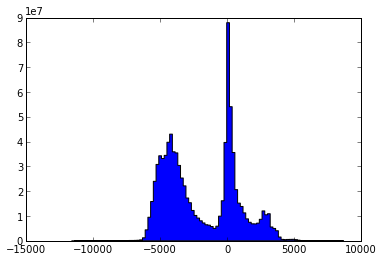
I prefer to work in units of chains. So how much is deeper than 1.8 chains (aka -36.576m)... 97.1% of the WORLD (oceans + other things that might be deeper but not in the ocean). And this is relative to whatever vertical datum topo30 uses.
Here is using the topo30 2012 edition from David Sandwell and JJ Becker. First a warning. There is a non-commercial license on the topo30 data. This is more restrictive than the GPL license that many are familiar with.
https://gist.github.com/schwehr/5789528 - http://nbviewer.ipython.org/5789528
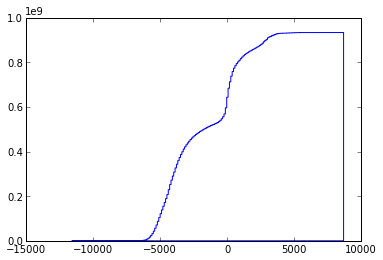
I prefer to work in units of chains. So how much is deeper than 1.8 chains (aka -36.576m)... 97.1% of the WORLD (oceans + other things that might be deeper but not in the ocean). And this is relative to whatever vertical datum topo30 uses.
Here is using the topo30 2012 edition from David Sandwell and JJ Becker. First a warning. There is a non-commercial license on the topo30 data. This is more restrictive than the GPL license that many are familiar with.
Permission to copy, modify and distribute any part of this gridded
bathymetry at 30 second resolution for educational, research and
non-profit purposes, without fee, and without a written agreement is
hereby granted ...

... use for commercial purposes should contact the Technology Transfer
& Intellectual Property Services, University of California, San Diego ...
wget ftp://topex.ucsd.edu/pub/srtm30_plus/topo30/topo30.grd
gdal_translate topo30.grd topo30.tif
grdinfo topo30.grd

topo30.grd: Title: topo30.grd
topo30.grd: Command: xyz2grd -V -Rg -I30c topo30 -Gtopo30.grd=ns -ZTLhw -F
topo30.grd: Remark:
topo30.grd: Pixel node registration used
topo30.grd: Grid file format: ns (# 16) GMT netCDF format (short)  (COARDS-compliant)
topo30.grd: x_min: 0 x_max: 360 x_inc: 0.00833333333333 name: longitude [degrees_east] nx: 43200
topo30.grd: y_min: -90 y_max: 90 y_inc: 0.00833333333333 name: latitude [degrees_north] ny: 21600
topo30.grd: z_min: -11609 z_max: 8685 name: z
topo30.grd: scale_factor: 1 add_offset: 0

# z above is altitude in meters relative to ?

# install ipython, gdal-py and numpy
ipython

import gdal

src = gdal.Open('topo30.tif')
topo30 = src.GetRasterBand(1).ReadAsArray()
num_deep = (topo30 < -36.576).sum()
'%.1f %% of the globe' % (num_deep / float(topo30.size) * 100)

67.7 % of the globe

num_ocean = (topo30 < 0).sum()
'%.1f %% of the ocean is deeper than 36.576m' % ( 100. * num_deep / float(num_ocean) )
'97.1 % of the ocean is deeper than 36.576m'Minus issues with resolution, vertical datums, tides and other stuff, 97.1% of the world is deeper than 20 fathoms and 91.4% is deeper than 100 fathoms.
https://gist.github.com/schwehr/5789528 - http://nbviewer.ipython.org/5789528
06.11.2013 21:21
smart phones and similar devices in the field
It's great to see that work continues at CCOM on this topic:
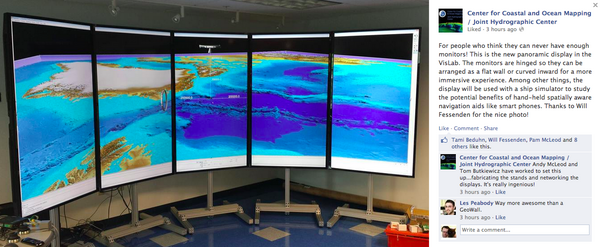
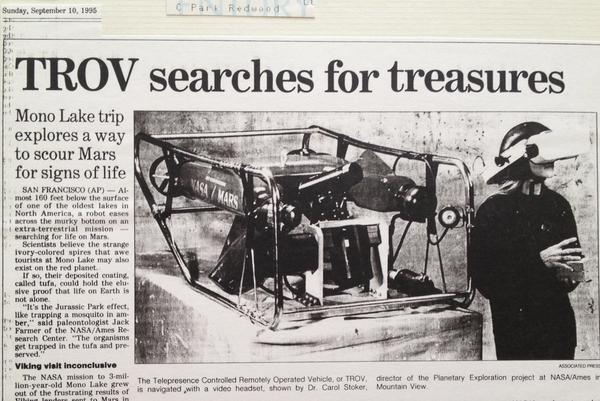
Back in 1990, I got to tour Scott Fisher's virtual reality lab at NASA Ames. After working on the Telepresence-ROV (TROV) vehicle in 1992, I was hooked on the idea of what might come when head mounted displays weren't so heavy that they quickly made your neck hurt and didn't require a 5kW generator.
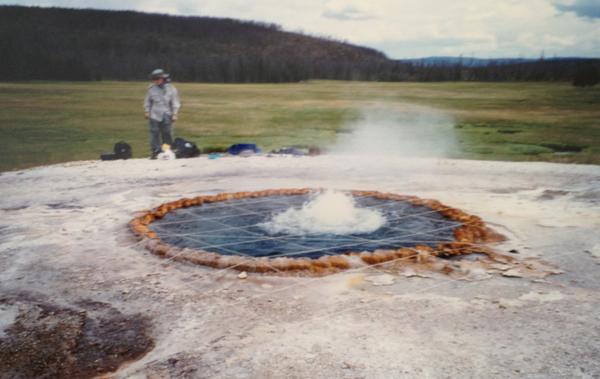
Hiking around the Southern Snake Range doing geologic mapping, I dreamed of devices that would sync up the mapping via hill top repeaters (yeah, I had a HAM license). Why waiting until the evening to all copy our data to the master mylar sheet? And if we could capture field photos throughout the day, we could share best photos of geologic units and particular features as we discovered them. Instead, I had to wait to get back to civilization to develop physical film.
The next couple years, I had visions of laser range finders, stereo cameras and mapping tablets as I worked in Yellowstone mapping hot springs and in Mono Lake trying to get the TROV to do useful science. Perhaps more scientists would take notes in the field if they were wearing Google Glass and could just speak their observations.
I did quite a bit at SIO in the 2002-2005 range with a 21 foot by 8 foot curved display and then when I got to CCOM in 2005, I proposed hand held and head mounted augemented reality and heads up displays. I got CCOM to pony up for the first smart phone bought on the NOAA grant (an iPhone 3S for me).
Roland and Tom have been doing some really neat development at CCOM and it should be fun to see what comes.
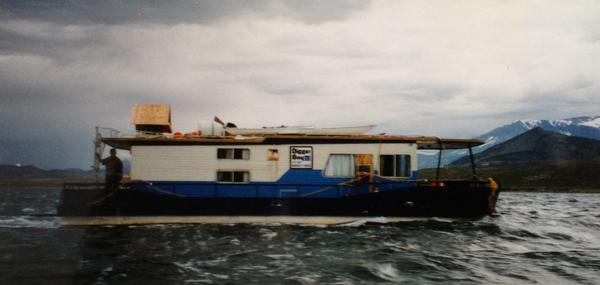
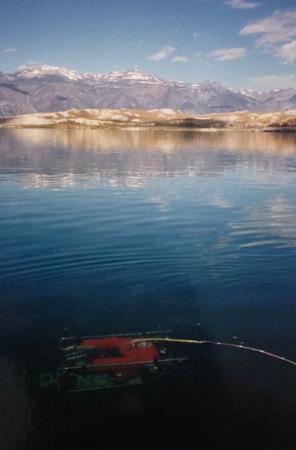
Some images from the first half of the 1990's that triggered some of my thinking on wearable / portable devices and how they might help people work in the real world. If only GPS SA had been off back then!
Sorry about the quality of the images.
For people who think they can never have enough monitors! This is
the new panoramic display in the VisLab. The monitors are hinged so
they can be arranged as a flat wall or curved inward for a more
immersive experience. Among other things, the display will be used
with a ship simulator to study the potential benefits of hand-held
spatially aware navigation aids like smart phones. Thanks to Will
Fessenden for the nice photo!
Back in 1990, I got to tour Scott Fisher's virtual reality lab at NASA Ames. After working on the Telepresence-ROV (TROV) vehicle in 1992, I was hooked on the idea of what might come when head mounted displays weren't so heavy that they quickly made your neck hurt and didn't require a 5kW generator.
Hiking around the Southern Snake Range doing geologic mapping, I dreamed of devices that would sync up the mapping via hill top repeaters (yeah, I had a HAM license). Why waiting until the evening to all copy our data to the master mylar sheet? And if we could capture field photos throughout the day, we could share best photos of geologic units and particular features as we discovered them. Instead, I had to wait to get back to civilization to develop physical film.
The next couple years, I had visions of laser range finders, stereo cameras and mapping tablets as I worked in Yellowstone mapping hot springs and in Mono Lake trying to get the TROV to do useful science. Perhaps more scientists would take notes in the field if they were wearing Google Glass and could just speak their observations.
I did quite a bit at SIO in the 2002-2005 range with a 21 foot by 8 foot curved display and then when I got to CCOM in 2005, I proposed hand held and head mounted augemented reality and heads up displays. I got CCOM to pony up for the first smart phone bought on the NOAA grant (an iPhone 3S for me).
Roland and Tom have been doing some really neat development at CCOM and it should be fun to see what comes.
Some images from the first half of the 1990's that triggered some of my thinking on wearable / portable devices and how they might help people work in the real world. If only GPS SA had been off back then!
Sorry about the quality of the images.
06.10.2013 12:43
Google Ocean bathymetry update - World Oceans Day
Saturday (2 days ago) was World Oceans Day.
We made a small G+ post for it:
Google Earth: Revealing the Ocean on World Oceans Day!
Google Maps: On World Oceans Day, it's the perfect time to dive in and explore!
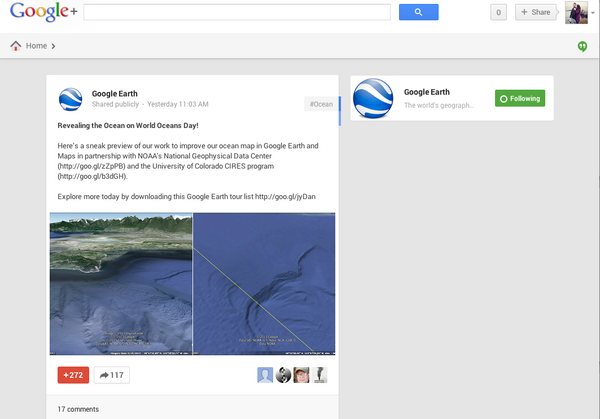
The text from the post and the image captions:
http://commondatastorage.googleapis.com/bathymetry/kml/NOAA-NGDC-OceanMapFootprints.kmz
Many thanks for the over 1000 +1's for the two G+ posts!
Google Earth: Revealing the Ocean on World Oceans Day!
Google Maps: On World Oceans Day, it's the perfect time to dive in and explore!
The text from the post and the image captions:
Here's a sneak preview of our work to improve our ocean map in
Google Earth and Maps in partnership with NOAA's National Geophysical
Data Center (http://goo.gl/zZpPB)
and the University of Colorado CIRES program (http://goo.gl/b3dGH).

Explore more today by downloading this Google Earth tour list http://goo.gl/jyDanHere

Visit a detailed ocean landscape in Boundary Bay, WA. NOAA's Crescent
Moegling says, "Within the Strait of Georgia, deep draft vessels
transit to several large refinery facilities. It's our job to provide
the mariner with the most accurate chart, with the most relevant
features and depths available for their safe navigation."

Notice the new high resolution 16 meter NOAA survey update (right)
relative to the lower 1 km resolution across the Canadian border
(left) in this area west of Bellingham, Washington.
The kmz showing the locations of the updates is here:
http://commondatastorage.googleapis.com/bathymetry/kml/NOAA-NGDC-OceanMapFootprints.kmz
Many thanks for the over 1000 +1's for the two G+ posts!